Managing Subscriptions
The Subscriptions section within your Account Profile provides a convenient way to view and manage your subscriptions. When you subscribe to a report, policy, or policy action rule, you will receive email communications from ActiveEye when the associated reports and policies are generated or triggered.
To prevent users from being flooded with alert notification emails when a high volume of alerts are generated in a short period of time, ActiveEye utilizes High Volume Alert Notification Emails. If the number of alerts generated by a policy or policy action rule within a configured time window reaches a configured threshold, email notifications for the policy or policy action rule generating the alerts are temporarily suppressed for a configured duration. ActiveEye manages these configurations on a customer-by-customer basis, and the feature can be disabled entirely based on a customer's needs. When suppression begins, a single High Volume Alert Notification Email is sent. This email includes:
- The name of the policy or policy action rule that triggered the rate limit.
- The number of alert events that triggered the rate limit.
- The time window in which those events occurred.
- The date and time when normal email notifications will resume.
Once the suppression duration expires, individual alert email notifications resume automatically.
Managing your subscriptions
- To access the Subscriptions section, on any page in ActiveEye, in the upper-right corner of the screen, click your email address, and then, in the menu that appears, click Account Profile.
The Account Profile page appears. - Click the Subscriptions tab.
The Subscriptions section appears.
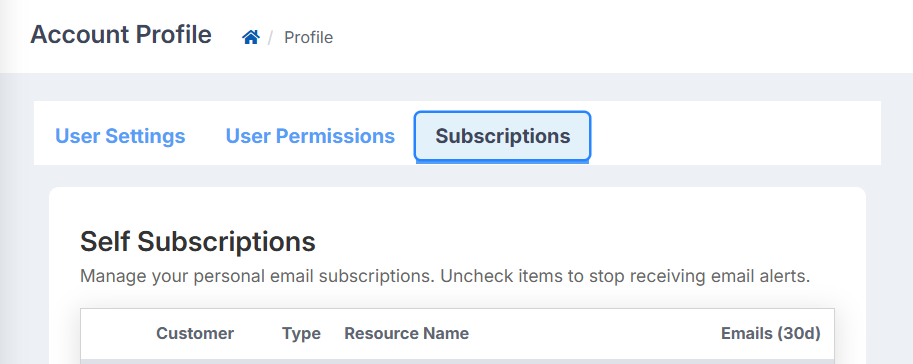
The Subscriptions section contains three subsections:- Self Subscriptions: This subsection displays the specific reports and policies to which you are subscribed. For information on how to subscribe reports and policies, see the Report templates section of the Reports topic and the Policies topic. In this subsection, you can click the link in any row to access a report or policy to which you are subscribed. You can also unsubscribe from specific reports and policies by clearing the checkboxes in their rows, and then clicking Save Changes.
- Group Subscriptions: This subsection displays the subscriptions that you receive because you are a member of a group contact. Only users who have been assigned the Admin role can modify group contacts.
- Suggested Subscriptions: This subsection displays suggested subscription profiles and the reports and policies associated with each. To view the reports and policies associated with a subscription profile, select the subscription profile in the Category box. The associated reports and policies will appear as rows in the subsection. You can click the link in any row to access the report or policy. You can also subscribe to or unsubscribe from specific reports and policies by selecting or clearing the checkboxes in their rows, and then clicking Save Changes.
Managing customer subscriptions
If you have access to multiple customer accounts (partnered or delegated), you can access the Customer Subscription Manager page to manage the subscription profiles of those accounts. When you subscribe to the ASTRO, VESTA, FLEX CAD, or PremierOne CAD subscription profiles for a given customer, you will receive emails when reports and policies within the subscription profile are generated or trigger alerts.
- To access the Customer Subscription Manager page, in the Suggested Subscriptions subsection of the Subscriptions section, click the Manage All Customers button.
note
If you do not have access to multiple customer accounts, the Manage All Customers button will not appear.
The Customer Subscription Manager page appears.
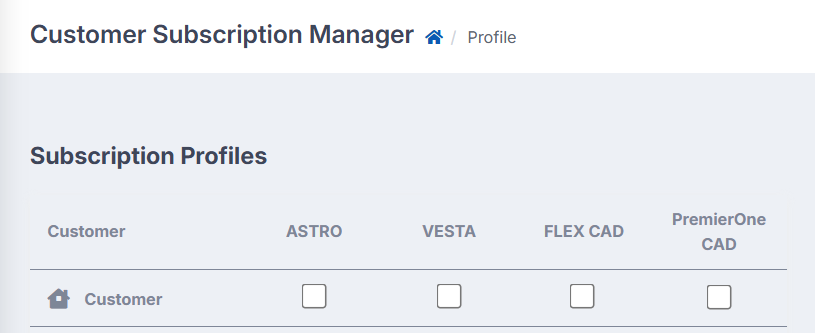
- To subscribe to or unsubscribe from a customer communications profile (ASTRO, VESTA, FLEX CAD, or PremierOne CAD), in the row for that customer, select or clear the checkbox for the communications profile to which you want to subscribe or unsubscribe. Repeat this step as needed.
- To save your changes, in the lower-right corner of the Customer Subscription Manager page, click Save Profiles.
You will now receive emails containing information derived from reports and policies that are relevant to the subscriptions you selected.
Customers to which you have access appear as rows in the table. Your Home Customer is indicated by the
 icon. Partner Customers are indicated by a
  icon. Customers for which you are a Delegated User are indicated by a
  icon.
icon.